
This documentation site is about the unstable (upcoming) Comentario version.
Switch to the stable version »
Embedded comments
Comentario features when embedding on other websites
Comentario’s embedded comment engine allows to render a comment thread (tree), and each page it’s embedded on has its own comment tree.
- Comments can have children — which we call replies. Child comments can also be collapsed and expanded by clicking the coloured left border line.
- Comment text can be formatted using the Markdown syntax: you can make words bold, insert images and links, and so on.
- Comment thread uses mobile-first responsive design, which adapts well to different screen sizes.
- Comments can be edited and deleted by authors and moderators (all of which is configurable).
- Other users can vote on comments they like or dislike (unless voting is disabled). Cast votes are reflected in the comment score.
- Comment threads can be sorted by time or score.
- Top-level comments can be stickied, which pins them at the top of the thread, regardless of the current sort.
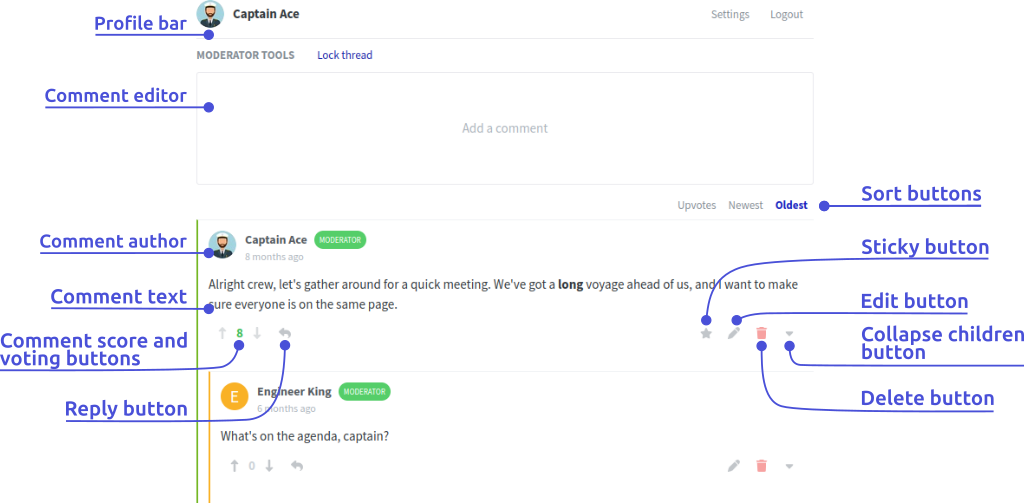
- There’s a variety of login options available for commenters; there’s also an option to write a comment without logging in (with an optional name), should the site owner enable it for this specific domain.
- Users can upload their own avatars, or opt to use images from Gravatar.
- There’s also a separate widget for displaying number of comments on a page.
Accessibility
The comment widget is built to meet the WCAG 2.2 Level AA success criteria, and it’s automatically checked against them (using axe) as part of Comentario’s end-to-end tests:
- All the controls (buttons, dialogs, the comment editor and its toolbar) can be operated with the keyboard alone, and carry accessible names for screen readers.
- Both the light and the dark theme switch to a high-contrast palette when the user’s operating system or browser requests more contrast (the
prefers-contrast: moremedia feature). In this mode, all text reaches a contrast ratio of at least 4.5:1, and icons, borders, and other non-text elements at least 3:1.
One known exception is the target size (SC 2.5.8): the comment’s expand/collapse toggle is deliberately a thin strip along the card’s left border, and inline links in comment headers and text may sit closer to each other than the criterion allows.